Claude AI for Real Estate Agents: A Beginner's Guide (2026)

Most real estate agents meet AI the same way: they open a chat window, type a question, get a decent answer, and close the tab. Helpful, sure. But you just used the most capable assistant on the market to do the equivalent of a Google search.
Claude can do a lot more than answer questions. It can do the work. Think less "search engine" and more "the assistant you've been meaning to hire." This is your 101 on what Claude actually is, what real estate agents are using it for, and how to get started without falling down the AI rabbit hole.
One thing up front, because it will save you months of trial and error: Claude is the hands, not the brain. It can execute almost anything, but it's only as good as the strategy and content you point it at. According to one digital agency, it is without a doubt, the agents who win with AI already have a marketing system. Claude just runs it faster.
Claude isn't a chatbot. It's a coworker you train once
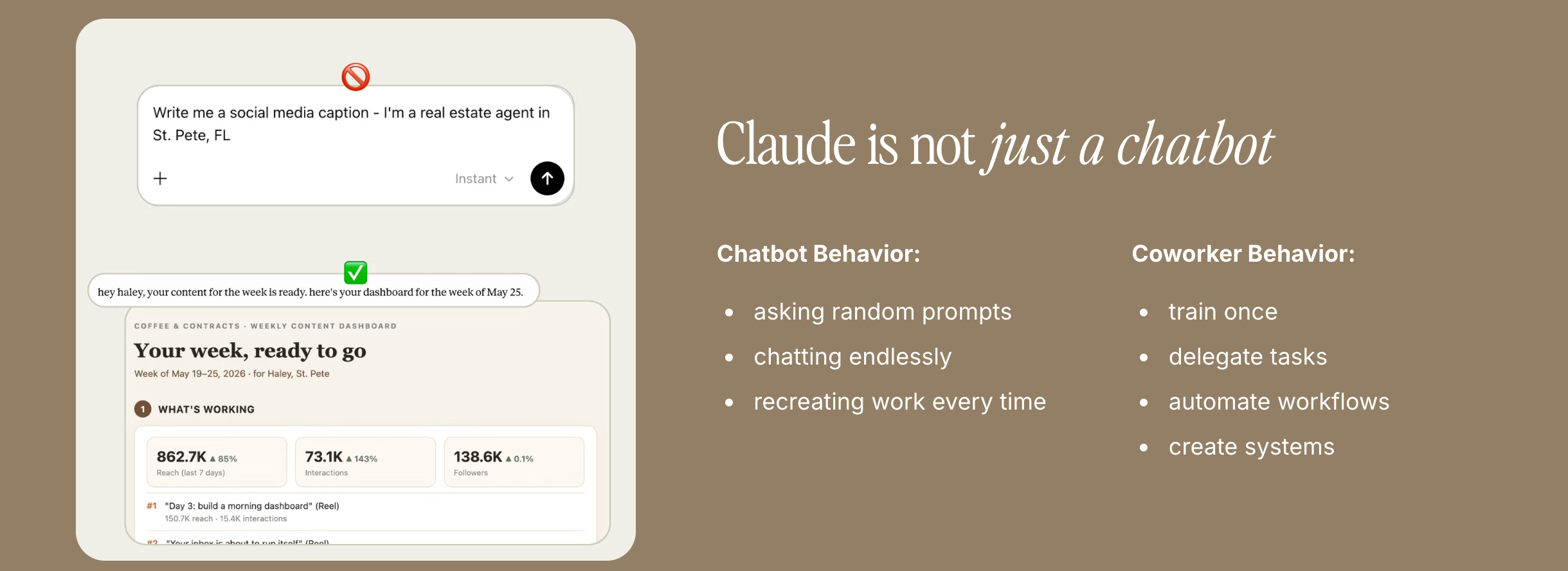
Here's the mindset shift that changes everything.
Chatbot behavior is what most people do: ask a random prompt, chat endlessly, and recreate the same work from scratch every single time. You're the one doing the heavy lifting, every time.
Coworker behavior is different. You train Claude once, delegate a task, and it runs that task the same way going forward. Instead of re-explaining how you write listing descriptions every week, you teach it your style one time and it remembers. That's the difference between a tool you poke at and an assistant that actually saves you hours.
Start by delegating one real task
Skip the endless chatting. The fastest way to understand what Claude does is to hand it a real job and watch it work, the way you would with a new assistant.
Download the Claude desktop app and open Cowork, the workspace where Claude can actually do things for you instead of just talking. Cowork runs on the paid plan (around $20 a month), and there's usually a free week to try it. Connect one low-stakes tool to start, like your Google Calendar. Then give it a real assignment:
Look at my calendar for this week and build me a prep sheet for each appointment: who I'm meeting, what it's about, and three things I should have ready.
Claude reads your actual week and hands back a usable prep sheet in a couple of minutes. You didn't write a prompt and copy a reply out of a chat box. You delegated a task and got finished work back. That is the difference, and it's the whole reason Claude is more than a chatbot.
Start with one tool and one task. Once that clicks, you give it more access and teach it more of your process. Here's how to think about that.
Think of Claude like a new hire
The easiest way to wrap your head around this is to treat Claude like a new team member. A sharp one who's always on, never forgets, and works at your pace. The catch is the same as any new hire: on day one, it knows nothing about your business. Your job is to onboard it.
There are three things that turn Claude from a generic tool into your assistant:
Connectors are its access. These are the logins to the tools it works in, like Gmail, your calendar, Google Drive, and your CRM. Connecting them is the equivalent of giving a new hire access to your systems. Be thoughtful here, because linking your email or CRM shares client data. Vet the tool and check your brokerage's rules first.
Skills are its SOPs. A skill is simply how Claude does a specific task, written down once so it does it your way every time. Your most important skill is your "Brand Brain," which teaches Claude your voice, your market, and how you sound. This is the brain you hand over. Claude brings the horsepower, but your voice, your market, and your strategy decide whether what comes out is any good.
Scheduled tasks are its schedule. You can tell your assistant when to run things, so the work happens while you're showing homes or asleep. A lead recap every morning, a review check every month, whatever you'd put on an assistant's calendar.
Give it access, teach it your SOPs, and you can even give it a name. From there, you just talk to your assistant, and the skills are what it knows how to do.
What agents are actually delegating
The point isn't to use Claude for everything. It's to hand off the repetitive tasks that quietly eat your week. A few examples agents are already running:
Morning catch-up. Wake up already briefed. New leads, deadlines due today, and drafted replies pulled from your calendar, email, and CRM before your first coffee.
Listing descriptions. Feed it the property details and your style, and it drafts polished, on-brand copy you can review and post. No more staring at a blank MLS field.
CRM follow-up. It can scan your CRM for leads that look active but are quietly going cold, then draft the follow-ups so you're not the bottleneck.
Transaction deadlines. It tracks every contract date so you never miss one, and helps keep clients calm from contract to close. Claude can also complement contract management software solutions by summarizing key terms, tracking obligations, and helping agents stay organized throughout the transaction.
Content support. It can speed up captions, repurpose what's already working, and personalize posts to your specific market faster than doing it by hand.
Notice the pattern. In every case you're delegating a finished task, not babysitting a conversation. And in every case the output is only as sharp as what you feed it. Point Claude at a real marketing system and it stops sounding generic and starts sounding like you.
Which Claude, and which model
A quick map so you're not confused by the names.
Claude Chat is the quick-question version, closest to what you might already know. Claude Cowork is the operational workspace, where you connect your tools and run real workflows and automations. Cowork is where the assistant magic happens, and it lives in the desktop app. There's also a Chrome extension for when you need Claude to work inside a website that doesn't connect directly, like your MLS or your Instagram inbox.
On models, don't overthink it. Sonnet is your daily driver for writing, organizing, and planning. Opus is the premium brainpower for deeper strategy and heavy projects, but it burns through usage faster. Haiku is the fast, lightweight option for simple tasks. Claude has a free version to test the waters, and the connected workflow features run on a paid plan that starts around $20 a month. Most agents should start with the entry plan and only upgrade if they're hitting limits. Once the bills start climbing, applying FinOps for AI costs is what keeps a growing Claude habit from quietly eating the marketing budget you set aside for actual client work.
A few guardrails before you dive in
You're still the agent. Review every output before it goes anywhere, run an originality check to ensure the content is authentic, never let anything auto-send to a client, and remember that Fair Housing, MLS, and license rules still apply to AI-generated work.
Your brokerage's rules come first. Check with your broker or compliance person before connecting tools or adopting a new workflow. And nothing here is legal or compliance advice, just what's working in the field.
How to get started
You don't need to learn every prompt and every tool. Start here.
Step 1: Connect one or two tools you use daily, like your email and calendar.
Step 2: Pick one repetitive task that drains your time and teach Claude to do it. Run it together once, then save it as a skill.
Step 3: Schedule it or run it on demand, tweak as you go, and add the next task once that one is humming.
The biggest mistake is trying to automate your entire business in week one. The win is picking one task off your plate, then another. Block an hour a week for "AI playtime" and you'll be ahead of most of your market within a month.
Plug your marketing system into Claude
This is where the brain and the hands come together. Claude is the hands. Coffee & Contracts is the brain: the operating system your marketing runs on, with the strategy, the content, and the weekly plan already built in. An assistant is only as good as the system behind it, and you can now connect that system straight to Claude.
Once your C&C account is linked (no API key, just a few minutes), Claude works from your real account instead of guessing. Ask it to pull your personalized content calendar, browse your template vault by pillar and type, write captions in your actual voice, and talk through your Instagram analytics to see what's working, all without leaving the app. That's the difference between Claude running generic workflows and Claude running your marketing.
Already a member? Connect it now with our step-by-step guide.
New to Coffee & Contracts? Get a free week of C&C content and see the system for yourself, then connect it to Claude when you're ready. Want a head start in the meantime? Subscribe to Coffee Drip, our free weekly marketing playbook, and join 40,000+ agents getting something worth handing to their new assistant every Tuesday.

More like this

What Agents Get Wrong About Choosing an Ideal Client

$9M Closed. Another $7M in her Pipeline. All from niching down on Instagram